
In the fast world of architectural design, changes happen often. They come from client ideas, new rules, or fresh thoughts during a project. Think of a building project. A client wants a bigger room for their family. This small change affects walls, pipes, lights, and costs. Without good control, it causes extra work, delays, and upset teams.
Building Information Modeling or BIM fixes this. BIM puts all design data in one smart 3D model. Change one part and updates spread to plans, sections, lists, and costs automatically. Architects track every edit exactly. They work together live on cloud tools. They find problems early with clash checks. This saves 20 to 30 percent of time and money. It helps build what clients really want. This blog shares simple steps to manage design changes in BIM.
Design changes always come up. Clients give feedback. Teams cut costs. Codes change. Engineers find issues. In old 2D drawing, you redraw sheets by hand each time. This leads to mistakes.
BIM makes it better. Elements like walls are smart and connected. Move a wall and all views update at once. Lists and checks update too. For example, make a window bigger. The side view changes. Sunlight math updates. Material counts adjust. No more long email chains. Everyone sees the same true model.
BIM tools make changes easy to see and record.
These work well with BIM 360 for teams anywhere.
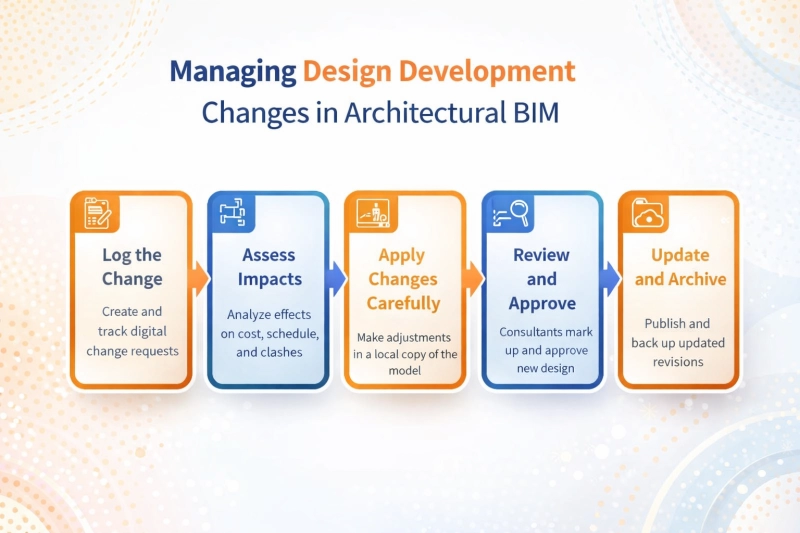
Every design change should be recorded using a digital request for information or change log. The record should clearly document what is changing, why the change is required, who requested it, and the expected impact on design, cost, or schedule. Including sketches or references improves clarity.
Before implementing any change, teams should run clash detection with structural and MEP models. They should also review the impact on quantities, costs, and timelines using BIM schedules and simulations. This step helps prevent downstream issues.
Design updates should be made in a local model copy. Parametric changes must be applied carefully, after which linked models should be reloaded. The updated model should be tested using three dimensional views or walkthroughs to validate spatial accuracy.
Updated models should be shared through coordination platforms such as Navisworks or Autodesk Construction Cloud. Feedback and markups from consultants must be collected, and approvals should be obtained before syncing changes to the central model.
Once approved, revised drawings should be issued with clear revision identification. Model versions must be archived securely, and the BIM Execution Plan should be updated to reflect the changes and lessons learned.
Even with great tools, mistakes happen. Here's how to sidestep them:
Standardizing these in your BEP shifts teams from firefighting to forward-planning.
Conclusion
Design changes challenge every architectural project, from client tweaks to code shifts. BIM turns this into a strength through smart tools like Revit compares, ACC workflows, and Navisworks checks. Teams track edits precisely, collaborate in real time, and catch issues early. The result is clear: 20-30% savings in time and costs, fewer site rework, and higher-quality deliverables that meet real needs. Managing design development changes in Architectural BIM is not just a technical requirement. It is a strategic advantage. With structured workflows, intelligent tools, and strong collaboration, BIM transforms design changes into opportunities for improvement.
By adopting BIM based change management practices, architectural teams can deliver coordinated, high quality buildings on time and within budget from concept to completion. To master these industry-critical workflows, choosing the right training institute is essential. Anita BIM Solutions stands out as Kochi’s best institute for practical BIM learning, offering hands-on training aligned with current AEC industry trends, real project workflows, and professional standards that prepare learners for real-world BIM roles.