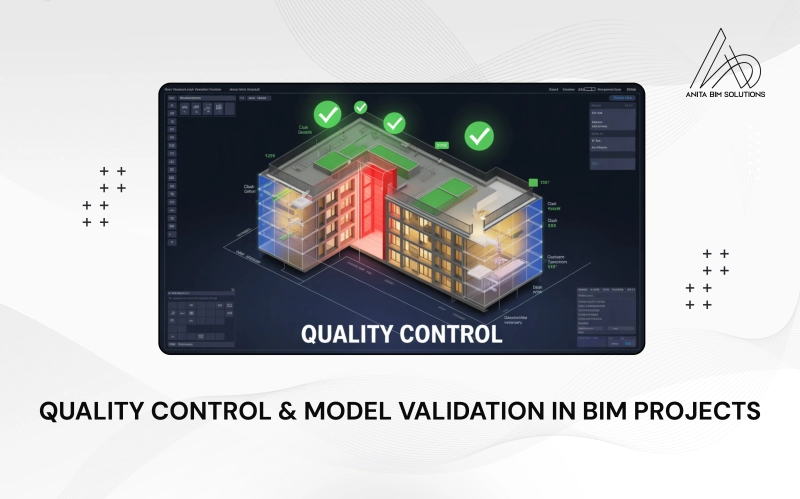
Building Information Modeling (BIM) offers a smart way for teams to plan, design, and build everything from houses to skyscrapers in a detailed 3D digital world before real construction even starts. But to get all these benefits, it’s absolutely essential that the BIM model be accurate, complete, and truly represent what’s meant to be built. That’s where quality control and model validation come in. These steps are like a safety net for your project; they make sure the digital model matches the project’s needs, follows industry and project standards, and doesn’t hide any mistakes that could cause trouble later. By carefully checking, coordinating, and validating every part of the BIM model, project teams can work together with confidence, avoid costly on-site errors, and deliver buildings that stand the test of time.
What Is Quality Control in BIM?
In BIM, quality control is about making sure every digital piece of your building, including walls, pipes, cables, and doors, looks and functions as it should, following the project requirements and standards. Here’s how it works:
- Accuracy: The virtual model must be precise. Mistakes, like walls in the wrong spot or missing pipes, will cause real headaches later.
- Consistency: All teams that include architects, structural engineers, and MEP designers must use the same standards so the information fits together, like pieces of a puzzle.
- Standardization: Teams follow industry rules, like LOD (Level of Development) for model detail or IFC formats for sharing models. This keeps things smooth across companies and software.
- Audit Trails & Documentation: Every change gets documented, so everyone knows who did what and when. This makes backtracking easy if a problem pops up.
- Verification: Models need regular checking, from simple visual inspections to automated software checks, to keep them up to standard.
How Do Teams Control Quality in BIM?
- Set Expectations Early: Define everything you want from the model at the start of the project, including the level of detail, naming rules, and required data.
- Use a BIM Execution Plan (BEP): This document lays out project goals, team roles, file naming, sharing rules, and deadlines so everyone’s on the same page.
- Automated Tools: BIM software like Navisworks, Solibri, or Revit’s built-in checkers automatically flag errors such as clash detection, data validation, and standards checking.
- Frequent Reviews: Set regular times for model audits so errors don’t pile up and everyone can catch problems early.
- Clear Communication: Keep project teams communicating. If an issue arises, work together to solve it before it grows.
What Is Model Validation in BIM?
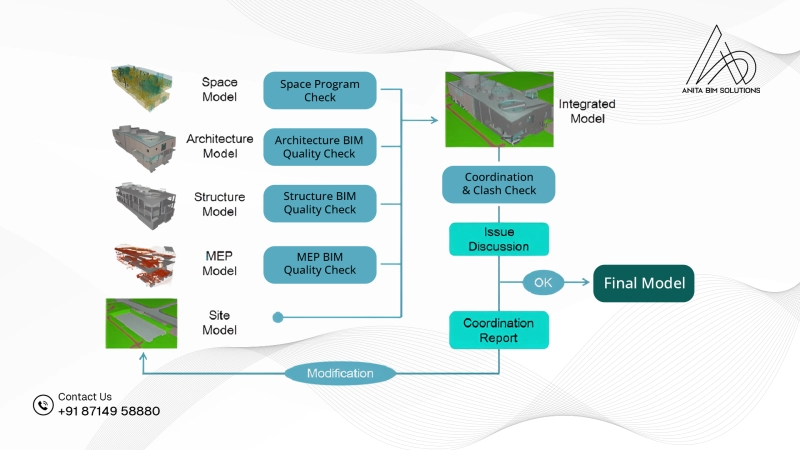
Model validation in BIM means checking the digital model to ensure it’s reliable, complete, and ready for use. When a model is validated, it’s not just a pretty picture but a trustworthy digital twin of the building.
Here’s what happens during validation:
- Clash Detection: Software scans the model for clashes (think pipes running through beams). Catching these now avoids costly fixes on-site.
- Rules & Regulations: The model gets checked against government codes, safety rules, and client requirements to make sure it ticks all the boxes.
- Data Checks: Every part in the model needs its details, such as size, material, and quantity, accurately entered.
- Spotting Duplicates: Double entries for items are flagged so your cost estimates and quantities stay real.
- Simulation Ready: Data for simulations (energy, lighting, and fire safety) is checked and validated for accuracy.
- Model Checkers: Programs like Solibri run automated scans, ensuring the virtual building passes all technical tests.
Common Areas to Check During QC and Validation
- Geometry and Model Accuracy
– Ensure elements are properly aligned, not duplicated, and correctly modeled.
– Check for clashes between architectural, structural, and MEP components.
- Naming and File Standards
– Verify that file names, model categories, and parameter names follow the project’s BIM Execution Plan (BEP).
- Information Completeness
– Check if all elements have the required parameters filled, such as material, dimensions, and asset codes. - Clash Detection and Coordination
– Use tools like Navisworks, Solibri, or BIM 360 Model Coordination to identify conflicts between different models early. - LOD (Level of Development) Compliance
– Make sure the model meets the correct LOD stage (100 to 500) for its project phase, such as concept, design, construction, or as-built. - Model Health and Performance
– Check for unnecessary model elements, oversized families, or unused views that can slow down the file.
Tools Commonly Used for QC and Validation
- Autodesk Navisworks – For clash detection and coordination.
- Solibri Model Checker – For rule-based model checking and reporting.
- Revit Model Checker for BIM 360 – For automated standards verification.
- BIMCollab / BIMTrack – For issue management and tracking.
These tools make the process more efficient, reducing human error and saving valuable project time.
To sum up, quality control and model validation play a crucial role in every BIM project, acting as the checkpoints that ensure a digital model is ready to guide successful construction. When project teams focus on these steps by setting clear standards, using automated tools, checking every detail, and working together, they help prevent mistakes and surprises onsite. These careful processes mean the BIM model is not only accurate and complies with project requirements, but it also makes collaboration smoother, saves both time and money, and leads to building that are safer, more reliable, and built exactly as planned. By placing quality control and validation at the heart of BIM workflows, teams can feel confident that their digital design will become a real-world building without costly problems along the way. For those who want to learn more about these essential BIM practices, Anita BIM Solutions stands as one of the best institutes in Kochi, offering the right training to master the concepts covered in this blog.